
Water Damaged Phone in Norwich? Do This First (2026 Emergency Repair Guide)
Dropped Your Phone in Water? Take a Deep Breath — Then Do This
It happens to almost everyone eventually. A pint slips at the pub on Prince of Wales Road. The kids’ bath splashes a bit too high. The phone goes in the toilet (yes, really — it is the number one cause of liquid damage we see at our Haymarket shop). One second your phone is fine, the next it is sitting at the bottom of a sink and your stomach drops.
Here is the good news: in 2026, modern iPhones, Samsung Galaxy phones, Google Pixels, and most flagship tablets are far better at surviving water than they were five years ago. The bad news? “Water resistant” is not the same as “waterproof,” and the damage you cannot see — corrosion on the logic board — is what actually kills phones days or weeks later.
This guide walks you through exactly what to do in the first ten minutes, what to never do (looking at you, bag of rice), and when to bring your device to a professional repair shop in Norwich. We have repaired thousands of liquid-damaged phones, tablets, MacBooks, and smartwatches since 2019, and the single biggest factor in whether a device survives is how quickly the right steps are taken.
The First 10 Minutes Matter Most
If your device has just gone in water, stop reading after this section and act. You can come back for the rest in a minute.
- Get it out of the water immediately. Every extra second underwater pushes liquid deeper inside.
- Power it off. Do not check if it still works. Hold the power button and shut it down. Electricity plus water is what causes the corrosion that destroys logic boards.
- Do not plug it in to charge. This is the fastest way to short-circuit a device that might otherwise have been saved.
- Remove the case, SIM tray, and SD card. This opens up drainage points and protects your data on removable storage.
- Wipe the outside dry with a soft cloth or microfibre. Pay attention to the charging port, speaker grilles, and headphone jack.
- Hold the device with the ports facing down and gently tap it against your palm to drain trapped liquid. Do not shake it violently.
- Leave it powered off and bring it to a repair shop the same day if possible. Time is the enemy.
What NOT to Do (The Myths That Kill Phones)
We see the same well-intentioned mistakes every week. Please do not do any of these:
Do not put it in rice. This is the most stubborn myth on the internet, and it does not work. Industry tests have shown rice is one of the least effective drying methods, and rice dust and starch get into your charging port and speakers. A phone left in rice is just a phone slowly corroding inside while you feel productive.
Do not use a hairdryer. Heat warps adhesives, damages the screen, and can melt internal components. It also pushes water further into the device rather than out.
Do not put it in the airing cupboard or on a radiator. Same problem — heat damage.
Do not press buttons repeatedly to “test” it. Every button press creates an opportunity for liquid to migrate to a new area.
Do not try to charge it to see if it still works. This is how a recoverable phone becomes a paperweight.
Do not leave it for a few days hoping it will “dry out.” Corrosion starts within hours. Waiting is the worst thing you can do.
Why Water Damage Is Sneakier Than You Think
Here is what most people do not realise: your phone might turn back on after a swim and seem completely fine. You breathe a sigh of relief. Three weeks later, the screen starts flickering, the battery drains in two hours, the speaker crackles, or it simply refuses to charge one morning.
That is corrosion. When water gets onto the logic board, it leaves behind mineral deposits and begins an electrochemical reaction with the tiny copper traces on the circuit board. The phone keeps working until enough corrosion builds up to break a critical connection — and by then, the damage is often beyond economical repair.
This is why we always recommend a professional liquid damage inspection even if your device appears to be working normally after a soaking. A 30-minute ultrasonic clean of the logic board, performed within 24 to 48 hours, can be the difference between a £45 service and a £300 motherboard replacement.
What We Actually Do at iTech Norwich for Liquid Damage
When you bring a water-damaged device into our shop at 2 Haymarket, here is what happens:
Free diagnostic. We do not charge to look at your device or quote a repair. You will know what is wrong and what it costs before you commit to anything.
Full disassembly in a clean workspace. Our certified technicians strip the device down to the logic board. This is not something you can do at home with a YouTube tutorial.
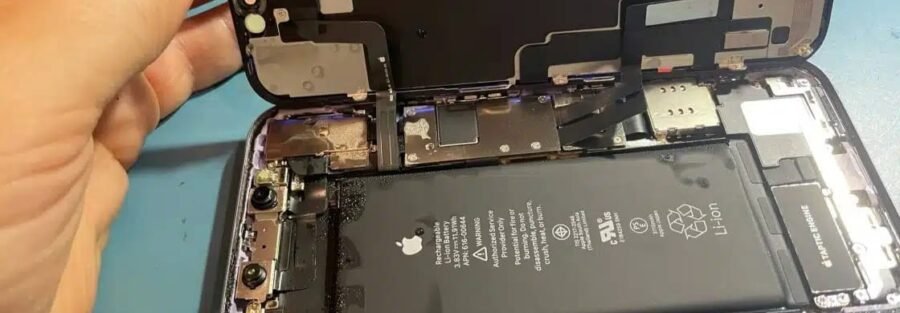
Ultrasonic cleaning. The logic board is bathed in a specialist cleaning solution that removes corrosion and mineral deposits without damaging components. This is the single most important step and it cannot be done with household products.
Component-level inspection. We check for damaged capacitors, ICs, and connectors under magnification, and replace any that have been compromised.
Reassembly with new seals. Where possible, we restore the original water resistance by replacing adhesive gaskets.
12-month warranty on the repair. If anything we touched fails within a year, we fix it free.
Most liquid damage repairs are completed within 24 to 72 hours. If your data is critical and the phone will not turn on, we also offer data recovery services.
How Much Does Water Damage Repair Cost in Norwich?
Honest answer: it depends on how bad the damage is and how quickly you brought it in. Here is a rough guide based on what we typically see in 2026:
- Diagnostic and ultrasonic clean only (caught early, no component damage): from around £45
- Clean plus battery replacement (very common — batteries are the first thing to fail): from around £75
- Clean plus charging port replacement: from around £85
- Clean plus screen replacement: varies by model — see our cracked screen price guide
- Logic board repair or component-level work: quoted individually after diagnostic
We always give a fixed quote before starting work. No surprises, no hidden fees, no “while we were in there” upsells.
When Repair Is Not Worth It — And What to Do Instead
Sometimes the kindest thing we can tell a customer is that their device is not economically repairable. If the logic board has been submerged in salt water, fizzy drinks, or sugary cocktails for an extended period, the corrosion can be so severe that a repair would cost more than the phone is worth.
If that happens, you have two good options at iTech Norwich:
1. Sell us the device for parts. Even a dead phone has value — the screen, camera, frame, and undamaged components can often be reused. Get a quote here.
2. Buy a quality pre-owned replacement. We sell fully tested, professionally refurbished iPhones, Samsungs, iPads, and MacBooks at a fraction of the new price, all with a warranty. Browse our current stock on the product page, or pop into the shop to see what we have.
It Is Not Just Phones — We Repair All Liquid-Damaged Devices
If you have spilled coffee on your MacBook, knocked a glass of wine onto your iPad, or your child’s smartwatch went swimming with them, the same principles apply: power it off, do not charge it, and bring it to us as quickly as you can.
We handle liquid damage repair for:
- iPhones (all models, including the latest releases)
- Samsung Galaxy, Google Pixel, OnePlus, Huawei, and other Android phones
- iPads and Android tablets
- MacBook Air, MacBook Pro, and Windows laptops
- Apple Watch, Samsung Galaxy Watch, and Fitbit devices
- Games consoles and handheld gaming devices
Laptop spills are particularly time-sensitive — coffee and sugary drinks are especially aggressive on motherboards. If you have spilled liquid on a MacBook or laptop, unplug it, hold the power button until it shuts off, flip it upside down to drain, and bring it in the same day if you possibly can.
Frequently Asked Questions
How long do I have to get my phone to a repair shop after water damage?
The sooner the better — ideally within 24 hours. After 48 hours, corrosion starts to do permanent damage to components. We have saved phones brought in a week later, but the success rate drops sharply with each passing day.
My iPhone is supposed to be water resistant. Why did it get damaged?
Water resistance ratings (like IP67 or IP68) are based on fresh water at specific depths and durations, tested when the phone is brand new. Real-world conditions — chlorinated pool water, salt water, soapy bath water, fizzy drinks — are much harsher. Seals also degrade over time, especially after a phone has been opened for a previous repair. Apple’s own warranty does not cover liquid damage for this reason.
Will Apple or Samsung repair my water damaged phone?
Usually not under warranty — liquid damage voids most manufacturer warranties, and the official “repair” is typically a full device replacement at a high cost. Independent repair shops like iTech Norwich can often save the original device for a fraction of the price.
Does putting my phone in rice work?
No. Rice is one of the least effective drying methods and can actually make things worse by introducing dust and starch into the ports. The myth persists because phones sometimes survive water damage despite the rice, not because of it. Skip the rice and bring it to a professional.
Can you recover my photos and contacts from a dead water-damaged phone?
Often, yes. Even when a device is beyond repair, we can frequently recover data from the storage chip. We will discuss data recovery options during the diagnostic if your device cannot be saved.
Do you offer same-day water damage repair in Norwich?
For straightforward liquid damage with no major component failure, yes — many repairs are completed the same day or within 24 hours. More complex cases involving logic board work may take 2 to 3 days.
What if my phone is still working after getting wet — do I still need a repair?
Yes, we strongly recommend at least a diagnostic and ultrasonic clean. A working phone today can become a dead phone in two weeks as corrosion spreads. Catching it early is dramatically cheaper than fixing a fully failed logic board later.
Is liquid damage repair covered by your warranty?
Yes — every liquid damage repair we perform comes with our standard 12-month warranty on the work and parts we replaced.
Bring Your Water Damaged Device to iTech Norwich Today
If your phone, tablet, laptop, or smartwatch has had a run-in with water, do not wait and do not try the rice trick. Bring it to our shop at 2 Haymarket, Norwich NR2 1QD, or call us on 01603 664 444 for advice. We are open Monday to Saturday 9am to 6pm and Sunday 10am to 5pm, and we offer free diagnostics, fixed quotes, and a 12-month warranty on every repair.
You can also message us on WhatsApp for a quick photo-based quote, or use our contact page to get in touch.
We have been Norwich’s trusted device repair shop since 2019, with hundreds of five-star Google reviews and thousands of successful repairs behind us. When your device is in trouble, every minute counts — and we are right in the heart of the city, ready to help.