
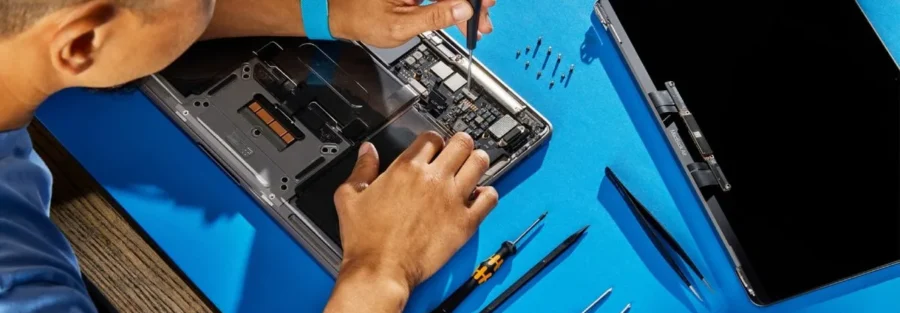
MacBook Repair in Norwich: The Complete 2026 Guide (Costs, Timings and What to Expect)
MacBook Playing Up? You're in the Right Place
When a MacBook stops working, it's never convenient. Your work is on it, your photos are on it, your whole digital life is on it — and there's no Apple Store in Norwich, which means a trip to Cambridge (60+ miles), a long wait for a mail-in repair, or a costly out-of-warranty quote. That's why more and more people across Norwich, Norfolk and the wider East Anglia region bring their MacBooks to us at 2 Haymarket, NR2 1QD instead.
At iTech Norwich we've been repairing MacBook Airs, MacBook Pros, iMacs and Mac Minis since 2019, with thousands of successful repairs and hundreds of five-star Google reviews behind us. We see customers from Norwich city centre, Wymondham, Dereham, Cromer, Great Yarmouth, North Walsham and the UEA campus regularly — and offer UK-wide courier collection for anyone further afield. This guide covers the most common MacBook issues we see, realistic repair costs in 2026, how long each fix typically takes, and when a repair is (or isn't) worth it. Whether your MacBook has a cracked screen, a dead battery, a sticky keyboard, a coffee spill, or it simply won't turn on — this page should answer your questions before you even walk in.
The Most Common MacBook Problems We Repair
1. Cracked or Damaged MacBook Screens
MacBook screens crack more easily than most people realise — a small object left on the keyboard before closing the lid is enough to shatter the display. We repair cracked LCDs, flickering screens, dead pixels, pink or green tinting, and backlight failures on every MacBook model from the 2015 MacBook Air through to the latest M3 and M4 MacBook Pros.
For newer Retina and Liquid Retina displays, we can often replace just the LCD panel rather than the whole display assembly, which can save you over £100 compared with an Apple Store repair. Need a phone screen instead? See our cracked phone screen price guide.
2. MacBook Battery Replacement
If your MacBook only lasts an hour off the charger, swells up and lifts the trackpad, or shows "Service Recommended" in System Information, the battery needs replacing. Apple's own guidance is that batteries are consumable and wear out after around 1,000 charge cycles — typically 3 to 5 years of regular use.
A swollen battery is not just inconvenient, it's a safety issue. If your trackpad is clicking oddly, your case feels bulged, or the laptop doesn't sit flat, stop using it and bring it in. We always use high-quality replacement batteries and recycle the old ones safely.
3. Keyboard and Trackpad Problems
Sticky keys, keys that repeat, keys that don't register, unresponsive trackpads — especially on the 2016–2019 butterfly-keyboard MacBooks, which are notoriously prone to dust failures. We can replace individual keys on many models, or the full top case where the keyboard is integrated.
4. Liquid Damage (Coffee, Wine, Water)
The single most common "my MacBook died suddenly" cause we see. Coffee and sugary drinks are especially aggressive because they leave sticky residue that corrodes the logic board for weeks after the spill. If you've just spilled something on your MacBook: unplug it, hold the power button until it shuts off, flip it upside down to drain, and bring it in the same day. Do not try to use it, and do not leave it to "dry out" — corrosion is already starting.
We disassemble the MacBook, ultrasonically clean the logic board, and replace any components damaged by corrosion. Caught early, most liquid-damaged MacBooks can be saved.
5. MacBook Won't Turn On / No Power
A MacBook that won't power on could be as simple as a failed charging port or as complex as a failed power IC on the logic board. We diagnose for free, tell you exactly what's wrong, and give you a fixed quote before any work starts. Many "dead" MacBooks are back to life within 24 to 48 hours.
6. Overheating, Fan Noise & Slow Performance
If your MacBook sounds like a jet engine, gets uncomfortably hot, or has become painfully slow, it often just needs a deep internal clean (dust clogs the fans and heatsinks over time), fresh thermal paste, or an SSD upgrade. These are some of the cheapest repairs we do and they can transform how the machine feels.
7. Logic Board Repair
When other shops quote you for a £600+ logic board replacement or tell you it's time to buy a new MacBook, we can often fix the board at component level instead — repairing individual chips, capacitors, or traces rather than swapping the whole thing. This is specialist work, takes longer, and isn't always possible, but when it is, it can save you hundreds.
8. Data Recovery
If your MacBook won't boot and you need your files back, we offer data recovery services. Most Apple Silicon MacBooks (M1, M2, M3, M4) have the SSD soldered to the logic board, which makes recovery more complex than on older models — but it's often still possible.
How Much Does MacBook Repair Cost in Norwich?
Every MacBook repair starts with a free diagnostic and a fixed-price quote. We never start work without your approval and there are never any surprise charges. Here are typical 2026 prices for the most common repairs — final quotes depend on your exact model:
- Battery replacement: from around £120
- Keyboard or top case replacement: from around £180
- Screen / LCD replacement: from around £220 (varies significantly by model)
- Charging port repair: from around £95
- Liquid damage diagnostic + ultrasonic clean: from around £75
- Fan cleaning + new thermal paste: from around £65
- SSD upgrade (older models): from around £110 plus drive
- Logic board component-level repair: quoted individually
- Data recovery: quoted after diagnostic
For comparison, Apple's official out-of-warranty repairs for similar issues typically start at £400–£900 and require shipping your machine off for 5–10 working days. Most of our repairs are done in Norwich the same week, often the same day.
iTech Norwich vs. Apple Out-of-Warranty Repair: Quick Comparison
| Factor | iTech Norwich | Apple Out-of-Warranty |
|---|---|---|
| Diagnostic | Free, no obligation | Charged or part of repair |
| Battery replacement | From ~£120 | £199–£249 |
| Screen replacement | From ~£220 | £499–£779 |
| Liquid damage | From ~£75 (clean) + parts | Often quoted as full replacement |
| Turnaround | Same day to 3 days typical | 5–10 working days (off-site) |
| Location | 2 Haymarket, Norwich (walk in) | Cambridge (60+ miles) or post |
| Warranty on repair | 12 months | 90 days |
Apple prices are illustrative based on publicly listed UK out-of-warranty service rates. Always check Apple's site for the latest figures before deciding.
How Long Does a MacBook Repair Take?
- Battery replacement: same day, usually 2–4 hours
- Screen replacement: same day to 24 hours
- Keyboard / top case: 24–48 hours
- Liquid damage: 24–72 hours
- Logic board repair: 2–5 working days
- Diagnostic (free, no obligation): typically under an hour while you wait, or same day
If you're in the middle of a work deadline and need a fast turnaround, tell us when you drop the machine off — we'll always tell you honestly what's realistic.
Why Bring Your MacBook to iTech Norwich?
You deal with the technician, not a call centre. You can walk in, ask questions, and see the workspace. There's no posting your laptop to a warehouse and hoping for the best.
Free diagnostic and fixed quotes. You'll know what's wrong and what it costs before you commit. If we can't fix it, we tell you honestly.
12-month warranty on every repair. If anything we replaced fails within a year, we fix it free.
Component-level repair capability. We're one of the few independent shops in Norwich and Norfolk that does proper board-level MacBook work rather than just swapping parts or sending you to Apple.
Established 2019, hundreds of five-star reviews. We're Norwich-based, not a drop-off point for a repair chain.
Courier collection available. If you can't make it into the shop, we can arrange courier collection and return anywhere in the UK.
When a MacBook Repair Isn't Worth It
Sometimes the honest answer is that a repair costs more than the MacBook is worth. If you have a 2013 MacBook Air with a dead logic board and a failing battery, we'll tell you straight: it's not worth the money. In that situation you have two good options:
1. Sell it to us for parts. Even a dead MacBook has value. Get a quote here.
2. Buy a tested pre-owned MacBook from us. We sell fully refurbished MacBook Airs and Pros at a fraction of the new price, all with a warranty. Browse current stock on our product page, or pop into the shop to see what's available.
Which MacBook Models Do You Repair?
All of them. Every MacBook Air and MacBook Pro from 2012 onwards, including:
- MacBook Air (Intel and Apple Silicon M1, M2, M3)
- MacBook Pro 13", 14", 15", 16" (Intel and M1/M2/M3/M4)
- MacBook 12" Retina
- iMac and iMac Pro
- Mac Mini and Mac Studio
We also repair iPads, iPhones, Apple Watches, Samsung devices, Google Pixels, Windows laptops, and games consoles. See our full service list on the homepage.
Frequently Asked Questions
Is it cheaper to repair a MacBook than to replace it?
Almost always, yes — especially for screens, batteries, keyboards and liquid damage. A new MacBook Air starts at around £1,149 in 2026, whereas most repairs are under £250. The exception is when multiple major components have failed on an older machine, in which case we'll advise honestly.
Will repairing my MacBook at an independent shop void the warranty?
If your MacBook is still under Apple's one-year warranty or covered by AppleCare+, take it to Apple first — don't pay for a repair that would be free. Once out of warranty, you can use any repair provider without issue.
Can you repair MacBooks with liquid damage?
Yes — coffee, water, wine, beer, all of it. Speed matters: bring it in the same day if possible. Power it off, do not charge it, flip it upside down to drain. Our liquid damage guide has the full first-aid steps.
Do you use genuine Apple parts?
Apple does not generally supply replacement parts to independent repair shops, so almost no third-party repairer in the UK uses "genuine" Apple-branded parts — including most chains. What we do use is high-quality OEM-equivalent and premium aftermarket parts, often made by the same factories that supply Apple. We'll explain the options at quote stage so you can choose what suits your budget. Every part we fit comes with our 12-month warranty.
Is there an Apple Store in Norwich?
No. There is no Apple Store in Norwich or anywhere in Norfolk — the nearest Apple Stores are in Cambridge (Grand Arcade) and Norwich's nearest Apple Authorised Service Provider options are limited. iTech Norwich offers professional MacBook repair locally on Haymarket, with no need to travel out of the city.
How long does an Apple Store repair take vs. iTech Norwich?
Apple typically ships MacBooks off-site for repair, which means 5–10 working days without your machine. Most of our repairs are completed in Norwich the same day or within 2–3 days.
Can you recover my data from a dead MacBook?
Often, yes. On older MacBooks (pre-2016) with removable SSDs, recovery is usually straightforward. On Apple Silicon models where the SSD is soldered, it's more complex but still frequently possible. Free diagnostic first — no recovery, no fee.
Do you offer courier collection for MacBook repairs?
Yes. If you can't get to our Haymarket shop, we can arrange secure courier collection and return anywhere in the UK. Get in touch for details.
My MacBook's battery is swollen — is it safe to use?
No. Stop using it, don't charge it, and bring it in as soon as you can. Swollen lithium batteries are a fire risk and the pressure can damage your trackpad and screen if left. Battery replacement is a straightforward same-day repair.
Book Your MacBook Repair in Norwich Today
Bring your MacBook into our shop at 2 Haymarket, Norwich NR2 1QD for a free diagnostic. We're open Monday to Saturday 9am–6pm and Sunday 10am–5pm. Call us on 01603 664 444 or message us on WhatsApp for a quick quote before you visit.
Free diagnostic. Fixed quotes. 12-month warranty. No jargon.