
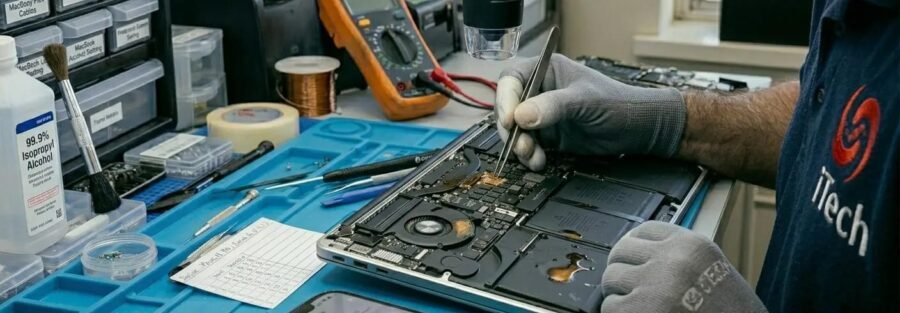
One Spilled Drink, One Dead Laptop — Unless You Act Fast
It's the worst feeling: a slipped elbow, a knocked mug, and suddenly there's coffee pooling around your trackpad. Or it's a glass of wine on Friday night. Or the cat decides your water glass needs to be on the floor — and your MacBook is in the way.
Liquid damage is the single most common "it died suddenly" cause we see at our Haymarket shop. The bad news: laptops and MacBooks are far more vulnerable to spills than phones. There's no IP rating, no waterproof seal, and the keyboard sits directly above the most expensive part of the machine — the logic board. The good news: if you act in the first ten minutes, most spills are recoverable.
This guide covers exactly what to do (and what to never do), why coffee and wine are deadlier than plain water, and how professional repair gives your MacBook the best chance of survival. If you've just had a spill, skip straight to the next section.
The First 10 Minutes: Emergency First Aid for a Wet Laptop
Stop reading and do these in order. You can come back for the rest in a minute.
- Unplug the charger immediately. Power coming in plus liquid is what fries components.
- Hold the power button until it shuts off. Don't bother saving your work. Don't wait for shutdown. Force it off in 5–10 seconds.
- Disconnect everything. Mouse, USB drives, headphones, external monitor — all out.
- Flip it upside down in a tent shape (open at about 90 degrees, screen and keyboard both pointing down) on a towel. This drains liquid out instead of letting it pool on the logic board.
- Wipe what you can reach with a soft cloth or kitchen roll. Don't push liquid into ports.
- Leave it powered off — do not turn it back on to "check if it works." That's how a recoverable laptop becomes a dead one.
- Get it to a repair shop the same day. Every hour matters. Corrosion starts within hours, not days.
That's it. Those seven steps give your laptop the best possible chance.
Why Coffee and Wine Are Worse Than Water
Plain tap water is bad. Coffee, wine, fizzy drinks, beer, juice and milk are catastrophic. Here's why:
Sugar. When the liquid evaporates, sugar crystallises on the logic board and around components. It's sticky, it conducts electricity unpredictably, and it traps moisture against the board for weeks.
Acid. Coffee, wine and fizzy drinks are mildly acidic, which speeds up corrosion of the tiny copper traces on the circuit board.
Salt and minerals. Salt water (from the seaside, sweat, or salty soup) is one of the most corrosive things you can spill on electronics.
Milk. Sugar, fat and protein together — sticky, smelly, and impossible to clean without a full strip-down.
This is why a "drying out" approach almost never works for sugary spills. The water evaporates, but the sugar, salt and acid stay behind, slowly eating the board for weeks until something critical fails. The phone or laptop seems fine for a fortnight, then dies one morning out of nowhere.
What NOT to Do (The Mistakes That Kill Laptops)
Don't put it in rice. Rice doesn't dry electronics — that's a myth. It also dumps starch and dust into your ports and fans.
Don't use a hairdryer. Heat warps the keyboard, melts adhesives, and pushes liquid further into the device.
Don't put it on a radiator or in the airing cupboard. Same problem — heat damage on top of liquid damage.
Don't try to turn it on to "test" it. Power plus liquid equals fried components. Wait for a professional.
Don't shake it violently. A gentle tilt to drain is fine. Shaking pushes liquid into areas it hadn't reached yet.
Don't try to take it apart yourself. Modern MacBooks and laptops use precision adhesives, fragile flex cables and components destroyed by static electricity. A YouTube tutorial isn't enough.
Don't wait a few days. This is the most damaging mistake of all. Corrosion is happening right now, not next week.
What Professional Liquid Damage Repair Actually Involves
When you bring a wet laptop or MacBook into our Haymarket shop, here's what we do:
Free diagnostic. We don't charge to look at the machine or quote the repair. You'll know what's wrong and what it costs before you commit to anything.
Full disassembly in a clean workspace. Our technicians strip the laptop down to the logic board. On a MacBook this means careful removal of the battery, screen connector, fans, speakers, trackpad and keyboard cables — all of which can be destroyed by a clumsy hand.
Ultrasonic cleaning of the logic board. This is the single most important step. The board goes into a specialist ultrasonic bath that uses high-frequency sound waves and a cleaning solution to lift corrosion and residue from every component — including under chips where you can't reach with a brush. This is not something you can do at home with isopropyl alcohol and a cotton bud.
Component-level inspection and repair. Under magnification we check for damaged capacitors, ICs, connectors and traces. Where individual components have failed, we replace them at component level rather than swapping the entire £600+ logic board.
Reassembly and testing. Everything goes back together with new adhesive seals where needed, then we run extended diagnostics before returning the machine.
12-month warranty on the repair. If anything we touched fails within a year, we fix it free.
Most liquid damage repairs are completed within 24 to 72 hours. Caught early, the success rate is high. Caught after a week of corrosion, it drops sharply — which is why speed matters so much.
How Much Does Laptop Liquid Damage Repair Cost in Norwich?
Honest answer: it depends on how bad the damage is and how quickly it was brought in. Typical 2026 prices at iTech Norwich:
- Diagnostic and ultrasonic clean only (caught early, no component damage): from around £75
- Clean plus keyboard or top case replacement: from around £180
- Clean plus battery replacement (common — batteries often fail first): from around £165
- Clean plus charging port replacement: from around £130
- Component-level logic board repair: quoted individually after diagnostic
- Data recovery (if device is unrecoverable): quoted after diagnostic
For comparison, Apple's typical out-of-warranty quote for liquid-damaged MacBooks is often a full replacement at £400–£900+, with 5–10 working days off-site. We aim to save the original machine in Norwich within a few days, at a fraction of the cost.
Coffee on MacBook vs. Water on Laptop: Does It Make a Difference?
Yes — and the difference matters.
Plain water on a Windows laptop: Often the easiest scenario. If powered off quickly and brought in within 24 hours, recovery rates are very high. Many laptops have some drainage built in.
Plain water on a MacBook: Trickier. MacBooks are tightly sealed and water doesn't drain easily. The keyboard sits directly above the logic board with very little gap.
Coffee, tea or fizzy drink on either: Sugar and acid mean immediate professional cleaning is essential. Even if it "seems fine," book a clean — failure in a few weeks is very common otherwise.
Wine on either: Worst-case scenario. Sugar, acid and pigment all in one. Get it in same-day.
Salt water on either: Highly corrosive. Treat as an emergency.
It Isn't Just MacBooks — We Repair All Liquid-Damaged Devices
The same professional cleaning process applies to:
- MacBook Air, MacBook Pro (all models, Intel and Apple Silicon)
- Windows laptops — Dell, HP, Lenovo, Asus, Acer, Microsoft Surface
- Gaming laptops — Razer, MSI, Alienware
- iPads, Android tablets and Microsoft Surface tablets
- iPhones, Samsung, Google Pixel and other smartphones — see our water-damaged phone first-aid guide
- Apple Watches, Samsung Galaxy Watches and Fitbits
- Games consoles and handheld gaming devices
- Wireless earbuds (AirPods, Galaxy Buds, etc.)
If it has a circuit board and it got wet, bring it in.
When Repair Isn't Worth It — And What to Do Instead
Sometimes we have to give the honest answer: this machine isn't worth saving. If a 2014 MacBook has been swimming in salt water for an hour, the logic board is probably beyond economical repair.
If that's the verdict, you have two good options:
1. Sell us the device for parts. Even a dead laptop has value — the screen, frame, and undamaged components can be reused. Get a quote here.
2. Buy a tested pre-owned replacement. We sell professionally refurbished MacBooks, laptops, iPads and phones at a fraction of the new price, all with a warranty. Browse our current stock on the product page.
Frequently Asked Questions
I spilled coffee on my MacBook and it still works — do I really need a repair?
Yes, we strongly recommend at least a diagnostic and ultrasonic clean. Sugar and acid from coffee continue to corrode the logic board for weeks after the spill. A working laptop today can become a dead one in a fortnight. Catching it early is dramatically cheaper than fixing a fully failed logic board later.
How long do I have to bring my laptop in after a spill?
The sooner the better — ideally within 24 hours, definitely within 48. After that, corrosion starts to do permanent damage. We've saved laptops brought in a week later, but success rates drop sharply with each passing day.
Will Apple repair my MacBook under warranty if I spilled coffee on it?
No. Liquid damage voids Apple's standard warranty. Apple's out-of-warranty quote for liquid-damaged MacBooks is typically very high — sometimes a full machine replacement. Independent shops like iTech Norwich can usually save the original device for a fraction of that cost.
Is putting my laptop in rice safe?
It doesn't help, and it can hurt. Rice doesn't pull moisture from a sealed device, and rice dust gets into your fans, speakers and ports. Skip the rice and bring the machine to a professional.
Can you recover my files if my MacBook is dead from a spill?
Often, yes. On older MacBooks (pre-2016) with removable SSDs, recovery is usually straightforward. On newer Apple Silicon MacBooks where the SSD is soldered to the logic board, it's more complex but frequently still possible. Free diagnostic first.
Do you offer same-day liquid damage repair in Norwich?
For straightforward spills with no major component failure, yes — many cleanings are completed the same day. More complex cases involving logic board work typically take 24 to 72 hours.
Is the repair covered by your warranty?
Yes — every liquid damage repair we do is backed by our standard 12-month warranty on the work and any parts replaced.
Do you offer courier collection if I can't get to the shop?
Yes, we arrange secure courier collection and return anywhere in the UK. Get in touch by phone or WhatsApp for details.
Bring Your Liquid-Damaged Laptop to iTech Norwich Today
If you've just spilled something on your MacBook or laptop, every minute counts. Bring it into our shop at 2 Haymarket, Norwich NR2 1QD, or call 01603 664 444 for advice. We're open Monday to Saturday 9am–6pm and Sunday 10am–5pm, with free diagnostics, fixed quotes and a 12-month warranty on every repair.
You can also message us on WhatsApp for a quick photo-based quote, or use our contact page.
For more on MacBook repair generally, see our complete MacBook repair guide for Norwich. For phone water damage specifically, read our water-damaged phone emergency guide.